
How to play Fuzzball
Fling your fuzz. Score the goal.
Found a bug?
Tell us what happened and we'll look into it.
Getting started
Fuzzball is simultaneous-turn, fuzzy-physics soccer. You and an opponent each control 3 fuzzballs; there's one shared white ball on the pitch between you.
Each turn, both players privately drag a direction for each of their fuzzballs, then lock in. Once both sides have submitted, every move plays out at the same time — there's no waiting for your opponent to finish their turn before you plan yours.
Knock the white ball into your opponent's goal to score. First to 3 goals wins the match.
Aiming & submitting a move
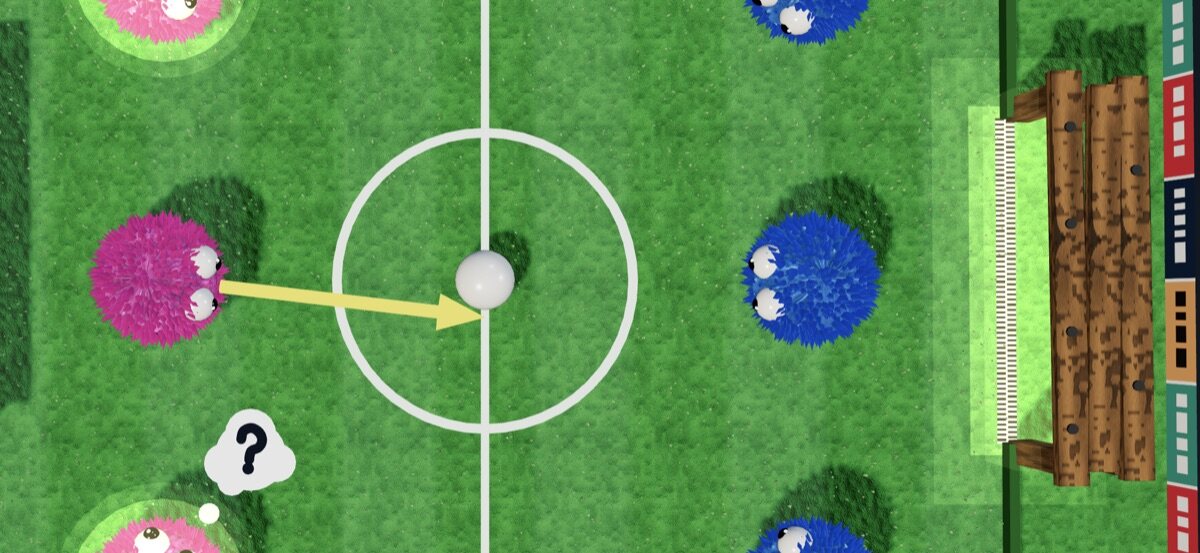
During the aiming phase you have 10 seconds. For each of your fuzzballs: press and drag away from it — a yellow arrow shows the direction and power — then let go to lock that vector in. The farther you drag, the harder the shot (power caps out at a fixed max drag distance, so there's no benefit to dragging off the edge of the screen).
You don't have to aim every ball — any fuzzball you leave alone just stays put for that turn. A very short tap on a fuzzball (rather than a drag) clears its shot instead of setting one, so it's safe to tap-check without accidentally firing a weak shot.
To submit your move, either tap the OK button in the toolbar, double-tap the field (double-click on web) anywhere that isn't one of your fuzzballs, or press Enter on a keyboard. Double-tapping a fuzzball itself doesn't submit — it maxes out that fuzzball's current shot to full power instead, so you can quickly punch up a weak drag without re-aiming it. The turn timer turns red and pulses with 3 seconds left — if it hits zero, whatever you've aimed so far is submitted automatically.
Once both players have submitted, the pitch goes into the executing phase and every ball moves at once — the exact same physics simulation runs on both devices, so what you see is what really happened.
Scoring & winning
- Only the shared white ball counts — knock it into your opponent's goal to score a point for your side.
- If one of your fuzzballs falls into a goal instead, it's not eliminated for good — it's just out of play until the next goal is scored, at which point the pitch fully resets with all fuzzballs back.
- If a team loses all 3 fuzzballs while the other side still has some on the pitch, that team automatically concedes the point. If both teams lose everything on the same turn, the point is replayed with no score.
- The match ends as soon as the two sides' goals add up to 3; whoever scored more of them wins.
3D camera controls
Switch to 3D mode from Settings for a full stadium view. The camera is independent from aiming, so these gestures never interfere with your shot:
- Pinch (or scroll-wheel + Ctrl/Cmd on web) to zoom.
- Two-finger drag (or scroll-wheel on web) — vertical tilts, horizontal orbits.
- The 🎥 button in the toolbar cycles between 5 preset angles:
| View | What you see |
|---|---|
| Top | Overhead, framed to the whole pitch. |
| Side | Fixed camera off the right sideline. |
| You | Default — behind your own side, looking down the pitch. |
If you've nudged the camera manually, the first tap of 🎥 just snaps back to the current preset before it starts cycling.
Game modes & inviting a friend
You'll need to finish one practice match before online modes unlock — think of it as a warm-up round against the house AI.
- Practice — instant match against Fuzzbot, a simple AI opponent. Pick any pitch. Your very first practice match doubles as an interactive tutorial: the game pauses at each phase to walk you through aiming, shooting, scoring, the camera and settings, and only moves on once you've tried each step (skippable any time).
- Play online — joins a public queue and pairs you with the first other player waiting.
- Play on Game Center — iOS only; matches you via Game Center instead of the Fuzzball queue.
- Invite a friend — generates a short link you can text or share. Whoever opens it joins your private match directly — no queue, and no need to have played a practice match first, since opening a friend's link is itself an informed choice to play.
Pitches
Classic
The original pitch.
Stadium
Rounded corners.
The Ring
Circular arena.
Crossfire
Diagonal goals in the corners.
Crossfire's goals sit in opposite corners instead of at each end, so shots come in on the diagonal.
Settings
Open the ⚙️ button in the toolbar during a match to change any of these:
| Setting | What it does |
|---|---|
| 3D mode | Switch between classic and 3D rendering mid-game. |
| Grass blades | 3D blades on the pitch (3D mode). |
| Simple graphics | Faster flat-shaded 3D — no shadows or fancy lighting. |
| Auto-hide toolbar | Hide the toolbar when idle in portrait; tap the field to hide it. |
| Invert Y | Flip vertical camera tilt direction. |
| Invert X | Flip horizontal camera orbit direction. |
| Cinematic camera | Intro, action and replay cameras. Off keeps your move-selection view (3D mode). |
Team colors are fixed — pink and blue, one per side — there's no color or sound setting to configure.
Tips
- Double tap the open field to submit your move — no need to hunt for the OK button.
- Double tap one of your fuzzballs instead to max out its shot at full power without submitting.
- Unaimed fuzzballs simply don't move that turn — you never have to fire all 3.
- Watch the timer: it turns red with 3 seconds left, and whatever you've aimed so far submits automatically at zero.
- A quick tap on your own fuzzball clears its shot — handy if you change your mind.
- In 3D, camera gestures always use two fingers (or the wheel) — one-finger drags are reserved for aiming, so you can't fat-finger the camera mid-shot.
- Losing a fuzzball into the goal isn't permanent — it's back on the pitch as soon as either side scores next.
- Invite links skip the public queue entirely and drop you straight into aiming.
FAQ
Why can't I play online yet?
Finish one practice match first — it's a one-time warm-up. Invite links are exempt.
What happens if I run out of time?
Whatever shots you've already aimed are submitted automatically; anything unaimed just stays put.
Is there sound?
Not currently — Fuzzball is a quiet game for now, so feel free to play your own music.
Can I play in landscape?
Yes — the toolbar auto-hides after a few seconds of inactivity in portrait if that setting is on; landscape keeps more of the pitch visible either way.
How long does a match take?
Each turn has a 10-second clock and the match ends at 3 combined goals, so most games wrap up in just a few minutes.
How is rank computed?
The leaderboard ranks players by rating, using the Elo system (the same math chess uses). Everyone starts at 1000. After each ranked match, both players' ratings shift based on the result and how big an upset it was — beating a higher-rated opponent gains you more than beating a lower-rated one, and losing to a lower-rated opponent costs you more than losing to a favorite. Wins, losses, and goals are tracked too, but only rating decides your spot on the board.